Let AI build the flow. Never outsource the blast radius
Power Automate · FlowAgent MCP
Let AI build the flow. Never outsource the blast radius.
Microsoft’s Power Automate plugin can build, edit, run, and diagnose cloud flows from Claude Code or GitHub Copilot CLI. The useful question is no longer whether AI can do it. It is when we should let it.
A natural-language request can now become a real Power Automate cloud flow. The agent can discover connectors, map dynamic values, validate the definition, create the flow, inspect failed runs, and even repair individual actions. That is a meaningful change in how automation can be built.
It is also exactly where teams can make a dangerous category error: confusing the ability to generate a workflow with the authority to decide what that workflow should do in production.
The new Power Automate plugin in Microsoft’s Power Platform Skills marketplace is genuinely useful. I would use it. I would not use it everywhere, and I would never treat a successful validation as proof that a flow is safe.
It is not one magic skill
The naming can be confusing. This is a Power Automate plugin that packages several task-specific skills and connects the coding agent to Power Automate through the FlowAgent MCP server.
Claude Code or GitHub Copilot CLI provides the reasoning and conversation. The plugin tells the agent how to approach Power Automate tasks. FlowAgent exposes the actual tools used to read and change environments, flows, runs, connections, and definitions.
Interprets the request, plans the work, and decides which permitted tools to call.
Provides task workflows, connector metadata, validation, environment routing, run diagnostics, and lifecycle operations.
Authentication uses Azure CLI. The agent can only reach what the signed-in identity and tenant policies allow—but that can still be a great deal.
The model decides which available tool to request. FlowAgent executes supported Power Automate operations. Your identity, permissions, data policies, and approval choices define the effective blast radius.
The plugin is self-contained, requires Node.js 18 or newer, and uses az login plus Microsoft authentication libraries to connect. Installation is performed from Microsoft’s Power Platform Skills marketplace:
/plugin marketplace add microsoft/power-platform-skills
/plugin install power-automate@power-platform-skills
Then run the plugin’s setup skill to verify Node.js, Azure CLI, authentication, FlowAgent connectivity, and the target Power Platform environment.
This is much more than “create a flow”
The official plugin currently covers most of the flow lifecycle:
The build-flow skill contains two particularly important safeguards. It requires connector operation metadata to be retrieved instead of guessed, and it requires validation before creation. New flows are created in a Stopped state. Enabling the flow is a separate operation.
Those are good defaults. They reduce the chance that a plausible-looking definition immediately starts processing real events. They do not replace a review.
How is this different from Copilot in the designer?
Power Automate already has an embedded Copilot experience for creating and editing cloud flows through natural language. Microsoft’s current FAQ says that the designer Copilot supports only a subset of connectors and is not currently equipped to fix flow errors.
The FlowAgent approach is broader and more operational. It can inspect run details, diagnose action failures, manage flows across environments, perform targeted definition edits, and work from an external coding-agent session. That power is the reason it needs a stricter operating model.
End-to-end use reveals the useful parts
The plugin becomes more interesting when it is evaluated across the complete flow lifecycle rather than through a carefully selected “hello world” prompt. The following scenarios show where the capability creates real value—and where human judgment remains essential.
1. A complete flow from a short business description
The first scenario starts with a simple request: when a Microsoft Forms response is submitted, save the response to SharePoint and email a summary. The agent checks existing connections, identifies an expired Forms connection, asks for missing business details, reads the form questions and SharePoint columns, maps them, discovers the correct connector operations, validates the definition, and creates the flow switched off.
This is a strong AI use case. The intended process is understandable, the connectors are standard, the result is easy to inspect, and the agent removes repetitive assembly work.
2. Explaining and optimizing an existing flow
The next flow exports a SharePoint list by adding Excel rows one at a time and relying on a fixed delay. The agent explains the definition, identifies the loop and delay as bottlenecks, and proposes a smaller flow that creates a CSV in one operation.
The value is not that AI knows a magical performance trick. The value is that it can read the whole definition, connect the anti-pattern to its consequences, and produce a reviewable alternative quickly.
3. Diagnosing failed runs
The plugin can inspect run history, identify failed actions, distinguish a root failure from downstream skipped actions, drill into loop iterations, and propose a remediation. This is often a better starting point than opening every failed run manually.
However, a technical diagnosis is not automatically a safe fix. Reconnecting an expired connection, changing an expression, and changing the business rule that expression represents are three different levels of authority.
4. Extending a complex batch process
The most convincing example is a flow using SharePoint batch APIs to import a large CSV. The agent reviews the existing design, recommends validating individual batch responses, and adds handling that separates successful and failed records while preserving failure reasons.
This shows that the plugin is not restricted to linear flows. It can reason about an existing technical pattern and add error-handling logic. It also shows why test data matters: a flow can validate successfully and still mishandle partial failures, duplicates, retries, ordering, or malformed records.
5. Documentation and estate-level analysis
Finally, the agent produces flow documentation and answers inventory questions such as which flows run most often or which environments contain failing flows. These read-oriented scenarios may be the best place for an organization to begin because they deliver immediate value with a smaller change risk.
The safest first use of an AI agent is usually not building something new. It is making the automation estate visible.
Use reversibility, observability, and impact—not novelty
A simple decision rule works better than a list of approved prompts:
Use AI more autonomously when the task is bounded, reversible, observable, testable, and has a small blast radius. Reduce AI authority as ambiguity, sensitive data, irreversibility, or business impact increases.
Swipe horizontally to see all table columns.
| Risk level | Good examples | Recommended AI authority |
|---|---|---|
| Green | Explain a definition, document flows, inventory environments, draft expressions, diagnose a failed test run, build a new low-impact flow in development. | Let the agent analyze and create drafts. Keep new flows stopped and review the result. |
| Amber | Edit an existing flow, repair a connection, copy across environments, optimize large-data processing, cancel or resubmit runs, enable a tested flow. | Require an explicit plan, backup, target confirmation, test evidence, and human approval immediately before the change. |
| Red | Production deletion, bulk disablement, permission changes, payments, irreversible record updates, regulated decisions, or flows handling highly sensitive data. | Use AI for read-only analysis or a proposed change set. Do not delegate autonomous execution. |
When AI is the right tool
Use it to remove mechanical assembly
Standard triggers, well-known connectors, clear field mappings, repetitive expressions, and predictable notification patterns are excellent candidates. The agent can retrieve the connector schema and build the plumbing while the maker concentrates on the process.
Use it to understand inherited flows
Flow estates contain automations with unclear ownership, generic action names, and years of incremental edits. Asking the agent to explain the trigger, branches, data sources, connections, retry behavior, and failure paths creates a useful baseline before anyone changes the flow.
Use it to investigate evidence
A failed run contains a dependency graph, action inputs and outputs, status codes, skipped branches, and sometimes thousands of loop iterations. AI is effective when it summarizes that evidence and points the reviewer to the first root failure instead of the loudest downstream symptom.
Use it to propose performance improvements
Repeated connector calls, unnecessary loops, fixed delays, missing filter queries, and poorly chosen pagination settings are patterns an agent can identify. Let it propose a new version, then compare run duration, action consumption, throttling behavior, and output equivalence.
Use it for documentation and governance discovery
Generating an inventory, documenting flow purpose, highlighting unhealthy flows, locating broken connections, and identifying owners are valuable tasks with a lower mutation risk. They also reveal where deeper human review should be prioritized.
When AI should not be the operator
Do not use autonomous AI where the business rule is still ambiguous
If process owners disagree about who may approve, when a payment should be released, which record is authoritative, or what counts as an exception, AI cannot resolve the missing governance. A polished flow only hides the unresolved decision behind working syntax.
Do not let it make irreversible production changes
The plugin can publish, disable, cancel, resubmit, and delete. These are operational capabilities, not routine drafting actions. Bulk cancellation can be correct during an incident and disastrous in the wrong environment. Deletion and mass updates should remain behind explicit human confirmation, verified IDs, backups, and a recovery plan.
Do not expose sensitive run data without reviewing the data path
A local MCP server does not mean the entire interaction stays local. Information returned to Claude Code or GitHub Copilot CLI can become context sent to the configured AI model. Flow definitions may contain business structure, and run inputs or outputs may contain personal data, tokens, customer information, or confidential content.
Before diagnosis, check whether the relevant actions use Secure inputs and Secure outputs. Avoid hardcoded secrets. Use environment variables backed by Azure Key Vault where appropriate. Confirm the organization’s approved AI client, model, retention settings, session-sync policy, and contractual data controls.
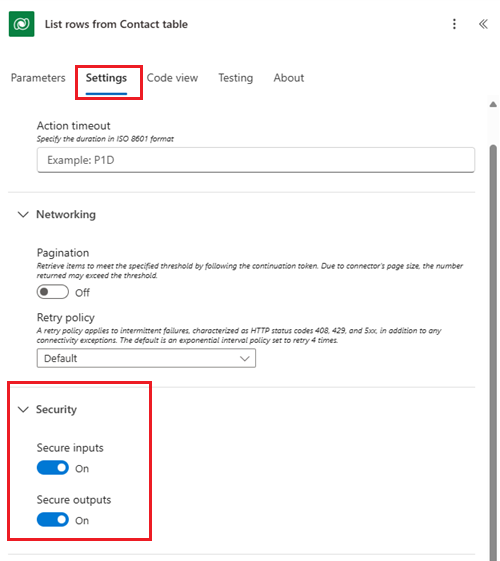
Data policies govern how Power Platform connectors can combine and move data. They do not replace a review of what context the coding agent sends to its AI provider.
Do not use it as the final authority for high-impact processes
Flows affecting money, employment, access rights, legal obligations, health, safety, or regulatory reporting require accountable owners and domain-specific controls. AI may help document, test, or propose the implementation. It should not silently decide exceptions or publish the result.
Do not use it when nobody can review the result
If the team cannot explain the generated expressions, connector behavior, retry policy, concurrency, idempotency, or failure handling, the correct response is not to trust the agent. Reduce the scope, involve someone who can review it, or use a simpler implementation.
Do not use production as the test environment
A flow that saves successfully is only structurally valid. It can still send the wrong email, update the wrong record, process duplicates, create an infinite trigger loop, exceed API limits, or fail only on null and boundary values. Validation is necessary. Representative testing is separate.
A safer operating model
Solution-aware flows provide an important safety foundation for AI-assisted changes. Drafts, version history, connection references, environment variables, and controlled deployments make a proposed change easier to inspect, move, and recover.

-
Start in a dedicated development environmentSet and report the environment explicitly. Do not rely on an old default from another session.
-
Use the least-privileged identityThe agent inherits the reach of the authenticated user. Do not sign in with tenant-wide authority for an ordinary flow task.
-
Classify the flow before editing itRecord its owner, purpose, data sensitivity, criticality, downstream impact, and recovery method.
-
Ask for analysis and a plan firstHave the agent explain the existing definition, assumptions, proposed changes, and unresolved questions before it writes.
-
Keep creation and activation separateCreate the flow stopped. Treat publish or enable as a new decision after review and test evidence.
-
Require validation and preflight checksUse exact connector metadata, validate the definition, resolve references, and report warnings rather than suppressing them.
-
Test failure paths, not only the happy pathUse synthetic data for nulls, duplicates, invalid types, timeouts, throttling, partial batch failures, and retry behavior.
-
Move through ALMPrefer solution-aware flows, connection references, environment variables, managed deployments, and controlled promotion to test and production.
-
Monitor the resultAdd failure handling, shared notifications, ownership continuity, and an operational view of run health.
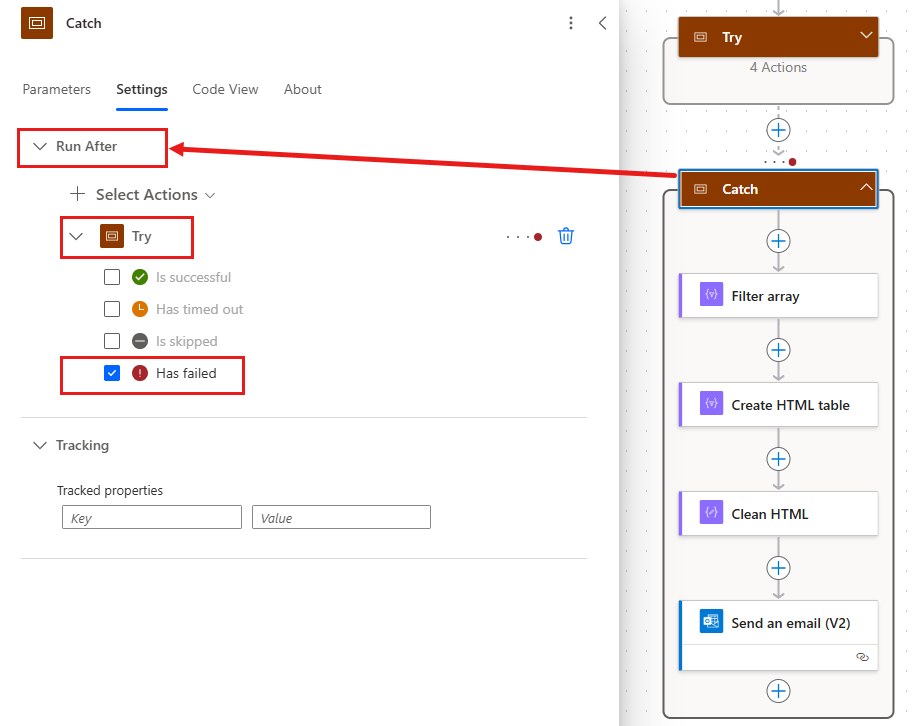
Error handling must be part of the generated design, not a cleanup task after the first production failure. Microsoft recommends grouping the main actions in a Try scope and configuring a Catch scope to run when the Try scope fails.
A prompt that establishes boundaries
Use the Microsoft Power Automate plugin for this task.

Target only the development environment named <ENVIRONMENT>.
Resolve the environment first and report its name and ID before making changes.

Build a solution-aware cloud flow in <SOLUTION> that:
<DESCRIBE THE BUSINESS OUTCOME AND ACCEPTANCE CRITERIA>

Boundaries:
- do not access, edit, disable, publish, enable, cancel, resubmit, or delete
  anything outside the named development environment;
- do not create or repair connections without asking first;
- use existing connection references and environment variables;
- do not place secrets, credentials, or personal data in the definition,
  prompt, test payload, or logs;
- create the new flow in Stopped state;
- use exact connector operation metadata; do not guess parameters;
- add explicit error handling, retry behavior, and failure notification;
- validate and preflight the complete definition before creation;
- use synthetic test data only.

Before creating anything, return:
1. the resolved target environment;
2. the proposed trigger and action sequence;
3. required connections and licensing assumptions;
4. data touched by every step;
5. failure, retry, concurrency, and duplicate-processing behavior;
6. unresolved questions and risks.

After approval, create the stopped flow and return its ID, validation results,
test plan, and a review table of every action. Do not publish or enable it.
The prompt cannot enforce tenant policy by itself. It makes intent explicit and gives the reviewer a contract against which to assess the agent’s behavior. Real enforcement still comes from identity, environment strategy, data policies, tool permissions, approvals, and ALM.
Do not solve permissions with “allow everything”
Both supported coding agents provide tool approval controls. GitHub explicitly warns that permissive options such as --allow-all give the agent broad access and should be used only in an isolated environment. Grant the smallest set of tools required for the task, preserve approval prompts for consequential operations, and never normalize a permanent “yes to everything” configuration.
A human review is part of the implementation
Before a generated or AI-modified flow is promoted, a reviewer should be able to answer every item below:
- The target environment, solution, flow, and connection references are correct.
- The business owner has approved the trigger, decisions, exceptions, recipients, and side effects.
- Every connector and custom API is permitted by organizational data policies.
- No credential, token, personal data, or confidential value is hardcoded or unnecessarily exposed in run history.
- The flow is idempotent or has an explicit duplicate-processing strategy.
- Concurrency, pagination, throttling, retry policies, timeouts, and platform limits are understood.
- Try/Catch-style scopes or equivalent failure handling cover meaningful failure paths.
- Partial successes—especially in loops and batch calls—are detected and reconciled.
- Representative tests include invalid, missing, duplicate, delayed, and high-volume inputs.
- Deployment, ownership, monitoring, rollback, and support responsibilities are defined.
AI changes the economics of building flows. It does not change who is accountable when an automation emails the wrong person, updates ten thousand records twice, or quietly stops processing approvals.
Frequently asked questions
Does the Power Automate plugin replace the visual designer?
No. It works alongside Power Automate. The agent can create or change a definition and inspect runs, while the designer remains an important review and testing surface.
Can it edit an existing cloud flow?
Yes. The plugin supports targeted action-level edits as well as larger updates. Existing production flows should be backed up or copied and changed through a controlled development and ALM process.
Does it enable newly created flows automatically?
The official build-flow skill instructs the agent to create a new flow in Stopped state. Publishing or enabling it is a separate lifecycle operation.
Can it diagnose a failed run?
Yes. It can inspect run details, action traces, dependencies, and loop iterations to identify likely root failures and suggest fixes. Sensitive inputs and outputs still require careful data handling.
Is AI-generated Power Automate logic production-ready?
Not merely because it validates or runs once. Production readiness also requires business-rule approval, security review, representative testing, ALM, monitoring, ownership, and a recovery plan.
Give AI the assembly work. Keep the authority.
Start with documentation, inventory, and failed-run diagnosis. Then build a stopped flow in development. The agent should make the work faster and more visible—not make production decisions invisible.
References
- Microsoft Power Platform Skills: Power Automate plugin
- Microsoft: build-flow skill instructions
- Microsoft: diagnose-flow skill instructions
- Microsoft Learn: FAQ for Copilot in cloud flows
- Microsoft Learn: Employ robust error handling
- Microsoft Learn: Benefits of solution-aware cloud flows
- Microsoft Learn: Secure data used in cloud flows
- Microsoft Learn: Power Platform data policies
- Microsoft Learn: Limits of automated, scheduled, and instant flows
- GitHub Docs: Allowing and denying Copilot CLI tool use
- GitHub Docs: Copilot CLI session data
- Anthropic: Claude Code setup and processing requirements


Comments
Post a Comment