Power Pages Finally Has Server-Side JavaScript — Here Are the Boundaries
Power Pages · JavaScript · Security
Server-side JavaScript is here. Learn the boundaries first.
Power Pages server logic can move sensitive operations out of the browser. It is also a constrained platform runtime—not a small Node.js server hidden inside your site.
Power Pages customization has long forced an uncomfortable choice: expose integration logic in client-side JavaScript, route everything through another service, or accept that a requirement does not belong in the site.
Server logic adds a new option. A page can call JavaScript that runs inside the Power Pages server runtime, where implementation details stay out of the browser and access can be governed by web roles and table permissions. That is a meaningful architectural change—but only if its constraints are treated as design inputs.
Server-side does not automatically mean secure. It means the security boundary has moved.
A site-native server endpoint
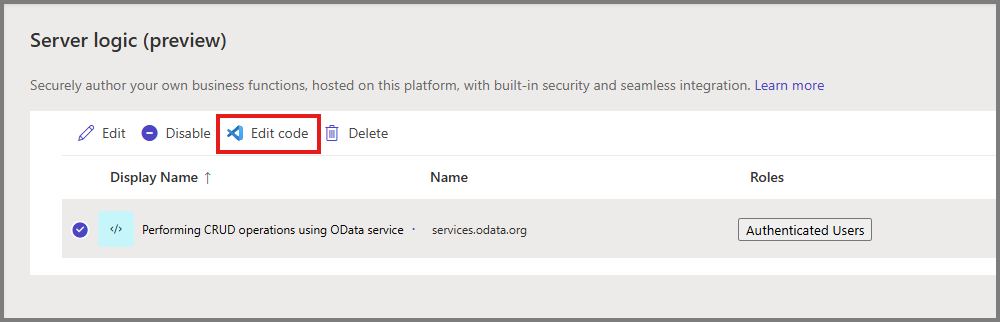
Each server logic record becomes an API endpoint under /_api/serverlogics/<name>. You implement functions for supported HTTP verbs such as get, post, put, patch, and del. Code and configuration are stored in Dataverse and participate in the Power Pages solution lifecycle.

The runtime provides built-in objects for request context, logging, site settings, environment variables, the current website and user, Dataverse operations, and outbound HTTP calls. That covers many integration and transformation scenarios without deploying a separate function app.
It is JavaScript, not Node.js
Microsoft documents ECMAScript 2023 support, but browser and general server APIs are deliberately restricted. There is no DOM, fetch, or XMLHttpRequest. Common dynamic-execution and process APIs—including eval, Function, require, filesystem access, child processes, timers, prototype manipulation, and dynamic imports—are blocked.
| You can | You cannot assume |
|---|---|
Call external HTTP services through Server.Connector.HttpClient | That npm packages or fetch are available |
| Read and write Dataverse through the server connector | That permissions are bypassed because execution is server-side |
| Read site settings and environment variables | That plain configuration is an appropriate secret store |
Log with Server.Logger | That logging replaces production monitoring and alerting |
| Handle standard HTTP methods | That the runtime is suited to long-running background jobs |
The default timeout documented by Microsoft is 120 seconds and can be raised to 240 seconds. A request-response API with a four-minute ceiling is still not a background processing platform.
Three controls must line up
Web roles and table permissions
Access to the server logic is assigned through web roles. Dataverse access is also constrained by table permissions. A role that can invoke an endpoint should not automatically receive broad access to every table the code might query.

CSRF protection
Every client request must include a Cross-Site Request Forgery token. Microsoft recommends using the site's shell.safeAjax wrapper, which obtains and sends the request-verification token. Do not replace it with an unprotected convenience call.
Outbound networking
Server logic can call external services. Tenant administrators can block outbound calls, and site settings can restrict allowed domains. The documented default permits all domains, so production sites should treat the allowlist as a required decision rather than an optional hardening step.
Do not paste API keys into the JavaScript.
Microsoft recommends keeping secrets in Azure Key Vault and referencing configuration through environment variables or site settings instead of storing credentials directly in server logic.
A small, defensible endpoint
Assume a page needs a calculated account summary. The browser should not receive raw rows or the implementation of the calculation. A server endpoint can retrieve the authorized record, validate the request, calculate the summary, and return only the required response.
async function get() {
  const id = Server.Context.QueryParameters["id"];
  if (!id) {
    return JSON.stringify({ error: "Missing id" });
  }

  const response =
    Server.Connector.Dataverse.RetrieveRecord(
      "accounts", id,
      "?$select=name,revenue"
    );

  Server.Logger.Log("Account summary requested");
  return response;
}
This is intentionally small. Production code also needs input-format validation, a consistent error contract, safe logging, negative-permission tests, and a response that does not reveal internal details. The client call should use shell.safeAjax so the CSRF token is included.
Server logic or another platform?
| Requirement | Better starting point | Why |
|---|---|---|
| Short site request, Dataverse operation, response needed immediately | Power Pages server logic | Site-native endpoint and permissions |
| Simple browser interaction with no sensitive logic | Client JavaScript | No server round trip required |
| Reusable Dataverse business rule across channels | Plug-in or Custom API | Rule belongs with the data platform |
| Long-running, retryable orchestration | Power Automate or Azure workflow | Durability, retry, run history |
| Complex dependencies, packages, compute, or networking | Azure Function / App Service | Full runtime and operational control |
| Asynchronous work after a user request | Queue plus worker | Request does not wait for completion |
The best use of server logic is not to replace every Azure Function. It is to eliminate unnecessary client exposure and unnecessary external infrastructure for logic that genuinely belongs to one Power Pages site.
Before production
- Assign only the required web roles and test with an unauthorized user.
- Verify table permissions for every Dataverse table and operation.
- Use
shell.safeAjaxor an equivalent verified CSRF-token pattern. - Restrict outbound domains instead of accepting the all-domains default.
- Keep secrets in an appropriate secret store; never commit them in the script.
- Validate query parameters and request bodies before using them.
- Return minimal error details to the client and keep sensitive diagnostics in controlled logs.
- Design for the timeout; move long-running work to an asynchronous platform.
- Include code, configuration, roles, permissions, and environment variables in the deployment review.
Use server logic to narrow the browser's authority—not to create a new unreviewed backend.


Comments
Post a Comment